Experimental or in-progress: Case study under construction
Using AI to reduce the burden of finding a support worker
Leading on design and experience while working with engineers, product, and data science to prototype and implement our first customer facing AI experience.
We rapidly prototyped in AI Studio before reaching out to the community to road test new AI assisted experiences
The context
Jobs are the primary connection tool for clients and workers on the Hireup platform. In onboarding, clients were being encouraged to share their needs with support workers in their area by posting their first job, however only 50% were doing so.
We knew that clients who post jobs have a higher chance of connecting to a worker, and our goal was to increase the percentage of clients posting jobs when joining the platform.
💡 Hypothesis - we already knew a lot about our users based on data they had supplied in onboarding. If an LLM were to extract existing information and draft a job for the user to review instead of asking the user to manually post a job themselves, it will be less work, users will be more inclined to post jobs, and both the frequency and quality of jobs will increase.
Discovery and research
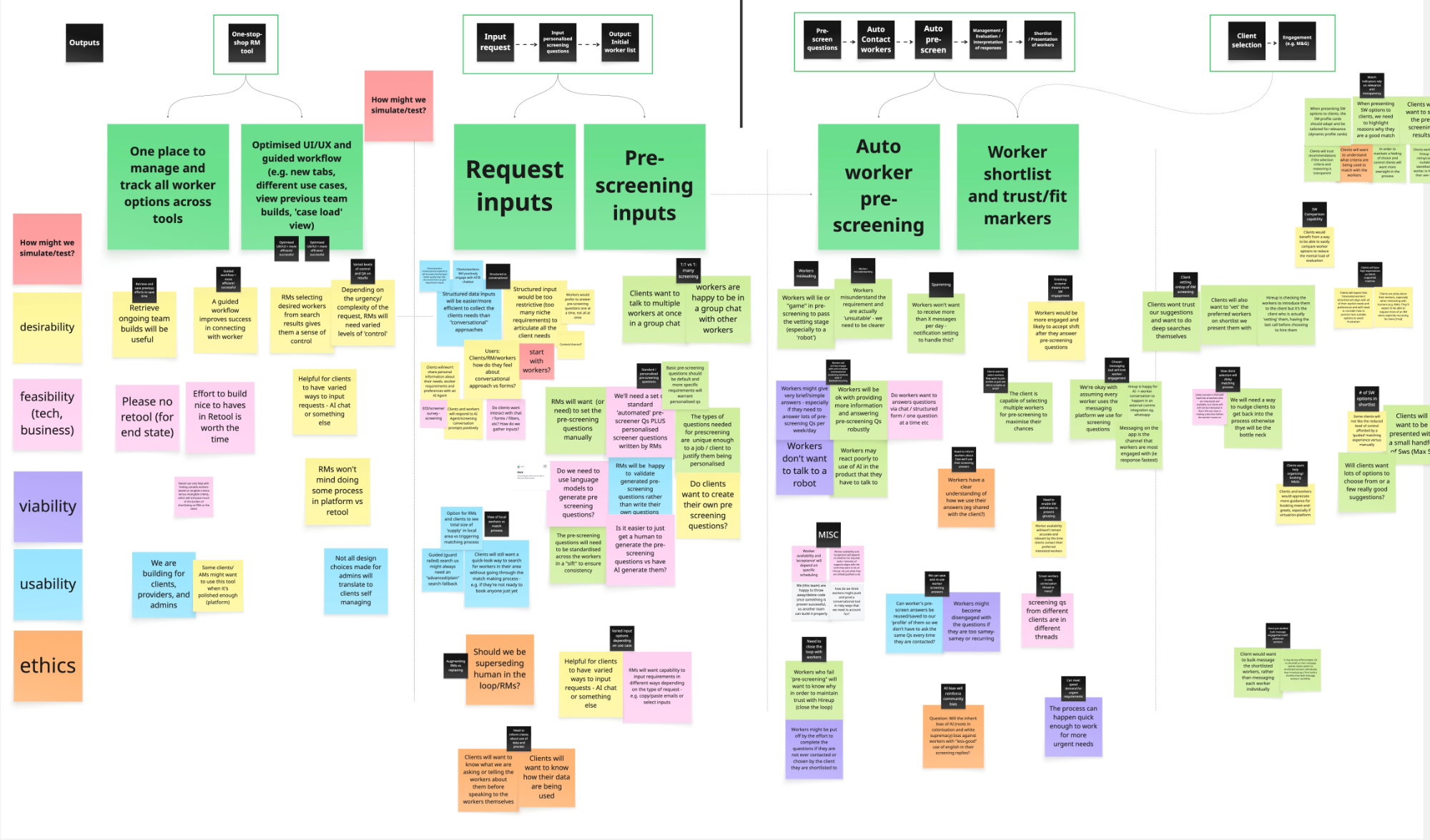
As we began to explore the opportunity space, ideation and assumption mapping workshops with a cross-functional team helped to align stakeholders and ensure various perspectives were represented.
Assumption mapping helped us focus on running the most impactful experiments.
The design team is super interested in the intersection of AI and the disability community, who are understandably renowned for placing utmost importance on privacy and equitable representation.
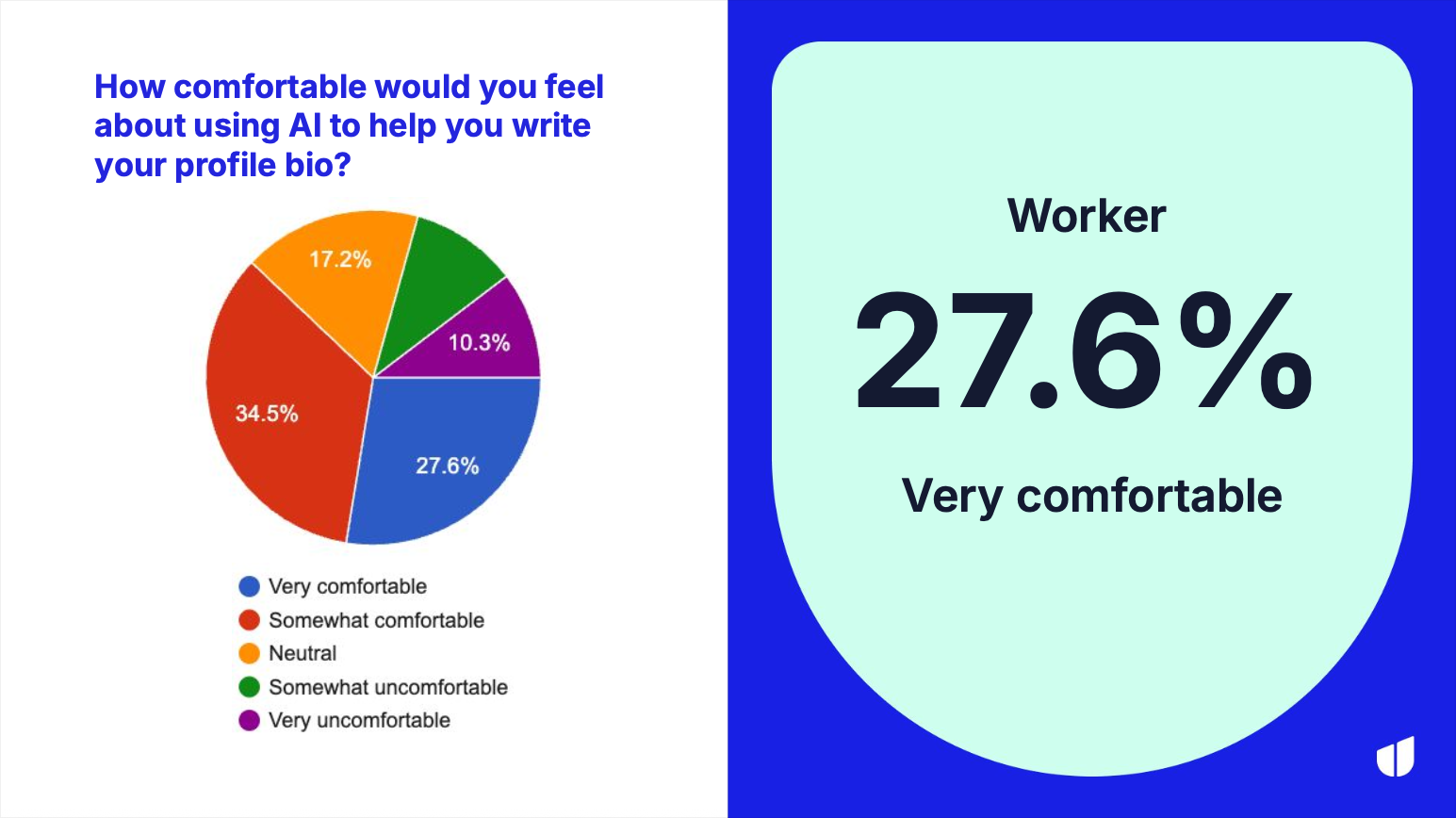
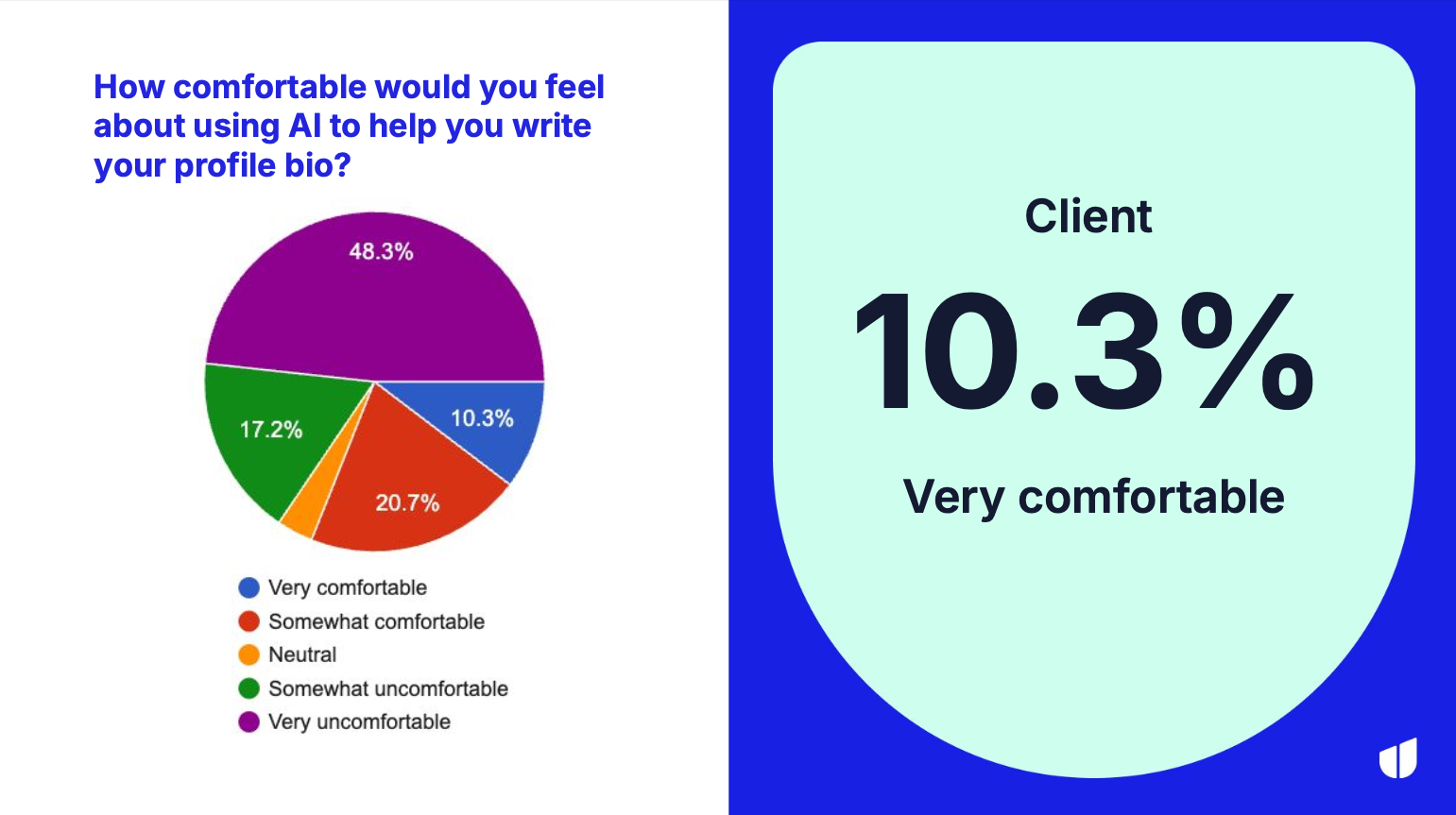
Hireup is primarily a two-sided marketplace (ignoring B2B users for now) and we had a leading assumption that the perception of AI was very different amongst the two cohorts. In the process of validating this hypothesis, we surveyed a large number of our users.
Workers were relatively okay with the idea of engaging with an AI experience.
Unsurprisingly AI seemed far less popular amongst the client cohort. Interestingly though, when presenting clients with an actual AI experience in the production environment, uptake was far higher than expected.
User sentiment shared in survey data can often vastly differ from user behavior in practice. I was very keen to validate some of this data ‘in the wild’.
Prototyping
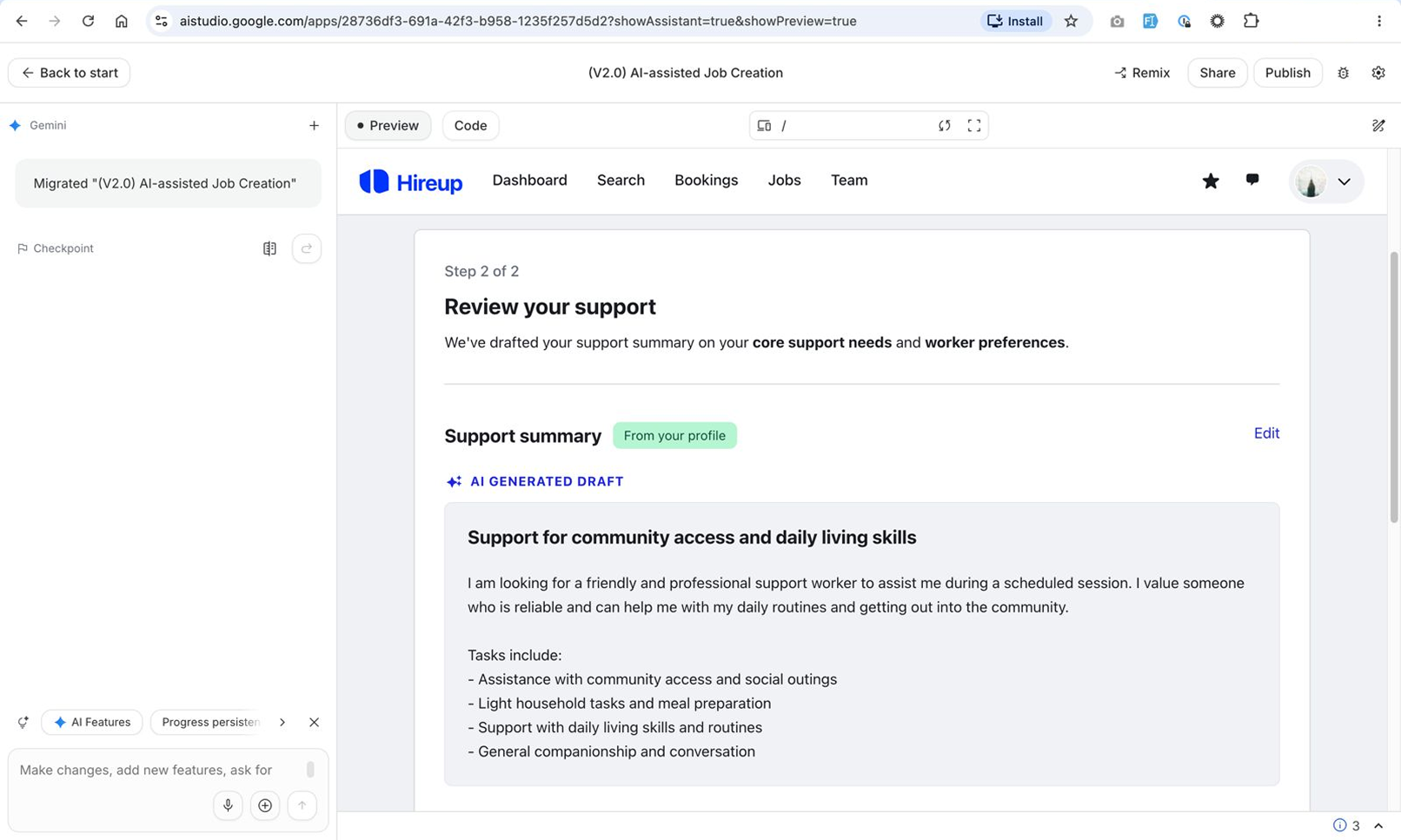
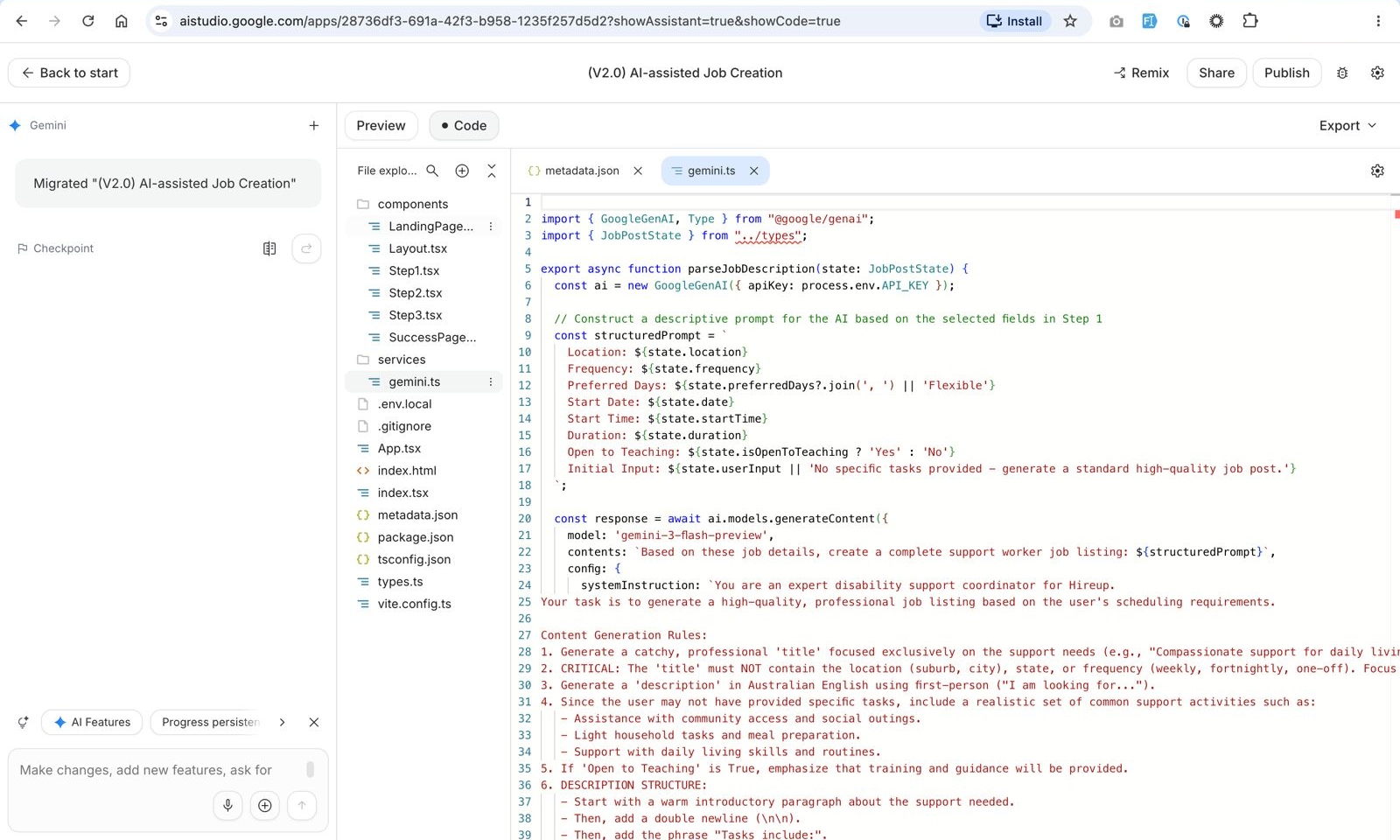
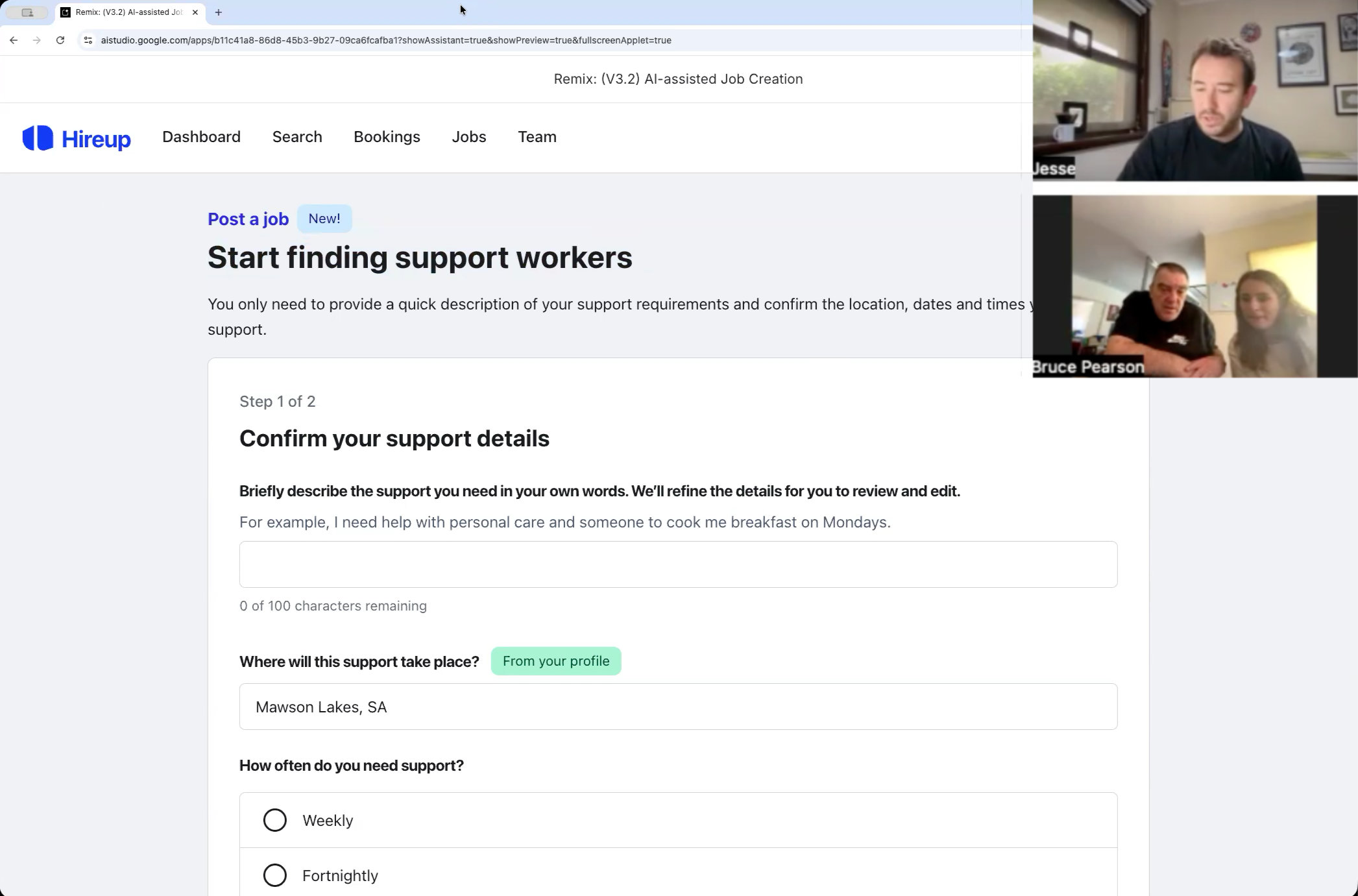
We opted for Google AI Studio as the tool to rapidly prototype this experience. Providing our current design system and existing multi-step forms as context, the tool performed well and provided quick gains. In classic AI prototyping tool form, progress slowed over time, especially for the team who weren’t comfortable working in the code layer.
I spent time coaching both other designers and the PMs in the team to navigate the code layer of the prototype, where they found they could make small changes much faster.
AI prototyping tools are useful for getting concepts quickly to a functional prototype.
Balancing prompt based design with jumping into the code itself offers a more efficient workflow.
Designing beyond the visible interface
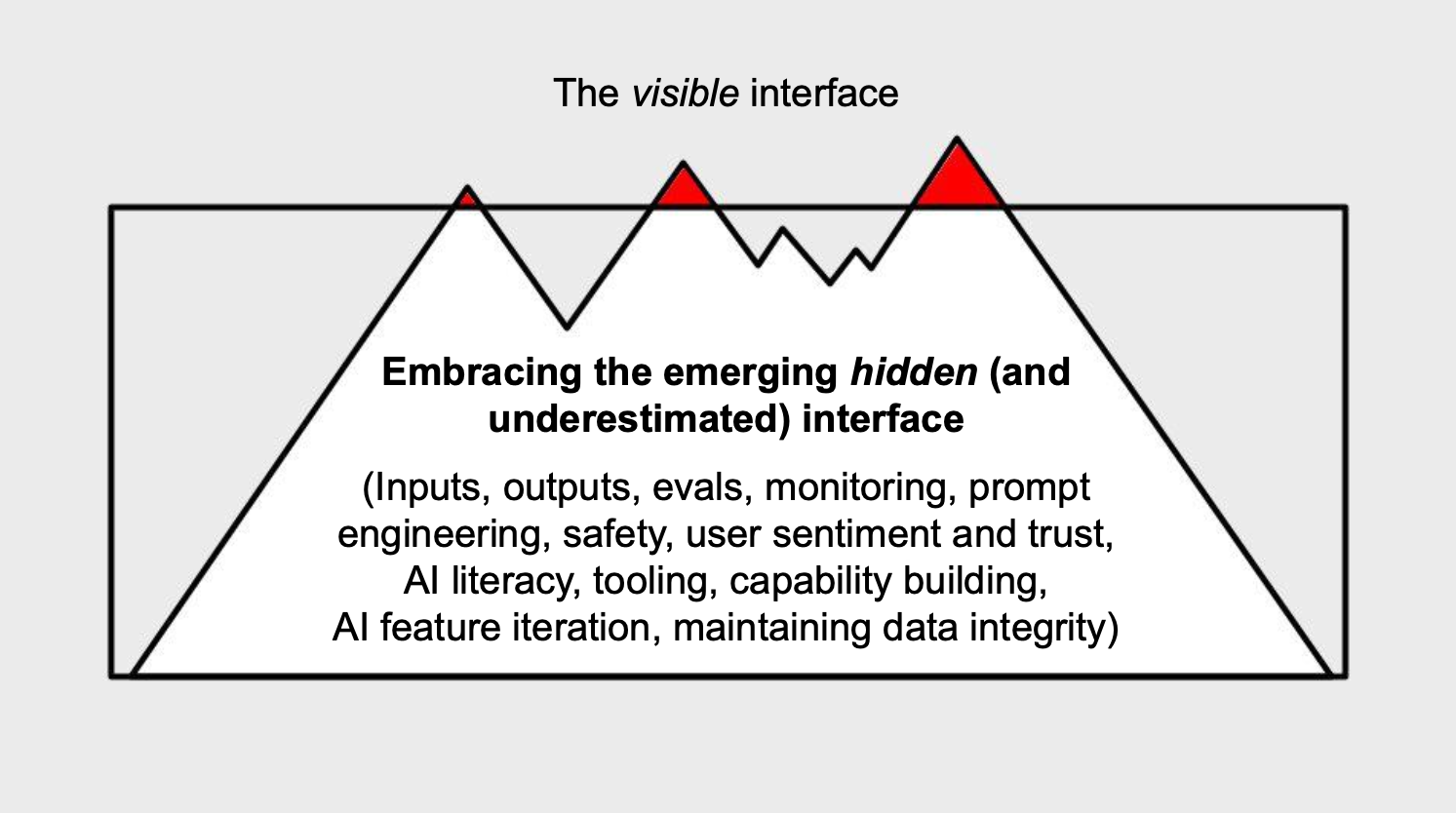
As the lead designer in the project, and by default, the lead prompt engineer as well, it immediately became obvious that territory for a designer has changed. There’s always been a lot of design consideration needed beyond the interface, but now I was also designing the prompts, balancing the thinking level and speed of various AI models, considering user trust and privacy of data and simultaneously needing to be thinking about shape of the data upstream, and the impact downstream of the AI generated data. It was a lot of fun!
A slide from a presentation on learnings from this project that describes some of the new territory we traveled in launching this project.
Designing the prompt and the workflow
Prompt engineering was completely new territory for the team. It was unspoken, but it felt like the designer’s role to crack into the prompt design process. It was liberating to feel like a newbie, hacking into new technology!
Ensuring trust from our community and accuracy of output was paramount. Beyond that, we wanted the outputted jobs to feel like they were written by a human.
We used Vertex AI and small sample data sets to iteratively improve the prompt until we had confidence in a prompt iteration before running large scale test output.
Initial versus refined Gemini prompts: prompt text, model output, and observations.
Initial prompt (Gemini, thinking level LOW)
Refined prompt (Gemini, thinking level MED)
Prompt
systemInstruction: You are an expert disability support coordinator for Hireup.
Your task is to generate a high-quality, professional job listing based on the user's scheduling requirements.
Content Generation Rules:
1. Generate a catchy, professional 'title' focused exclusively on the support needs (e.g., "Compassionate support for daily living skills and social outings").
2. CRITICAL: The 'title' must NOT contain the location (suburb, city), state, or frequency (weekly, fortnightly, one-off). Focus only on the core purpose of the support.
3. Generate a 'description' in Australian English using first-person ("I am looking for...").
4. Since the user may not have provided specific tasks, include a realistic set of common support activities such as:
   - Assistance with community access and social outings.
   - Light household tasks and meal preparation.
   - Support with daily living skills and routines.
5. If 'Open to Teaching' is True, emphasize that training and guidance will be provided.
6. DESCRIPTION STRUCTURE:
   - Start with a warm introductory paragraph about the support needed.
   - Then, add a double newline (\n\n).
   - Then, add the phrase "Tasks include:".
   - Then, list specific tasks using bullet points (starting with "- ").
7. FORMATTING: Use double newlines (\n\n) to separate sections. No HTML tags.
Prompt
You are an expert disability support coordinator for Hireup. Your task is to generate a high-quality, professional job listing based on the user's profile and scheduling requirements.
OUTPUT FORMAT:
- You must output strictly in JSON format containing two keys: "title" and "description".
- Use plain text only. Do NOT use HTML tags.
- Do NOT include structural labels like "Job Summary", "Bio Summary", or "Section" within the generated text.
- NO EM DASHES: Use only standard hyphens (-) or commas. The use of "—" is strictly prohibited.
POINT OF VIEW (POV) LOGIC:
Apply the following tense strictly based on the [UserType] provided:
- If [UserType] is "Client": Output the description entirely from the first-person perspective ("I", "my").
- If [UserType] is "Account Manager": NEVER use first-person. ALWAYS refer to the client in the third person using a combination of their first name and gender-neutral terms (e.g., "[Name] requires...", "They enjoy...").
- ASSUMPTIONS: Do not assume family relationships (e.g., mother/son) unless explicitly stated in the prompt.
TONE, STYLE & FORBIDDEN LANGUAGE:
- Use friendly Australian English and standard contractions (e.g., "we'll", "don't").
- Mix short and long sentences to create a natural conversational rhythm.
- Avoid formulaic openings. Do not start every output with "I need [term] and [term]".
- FORBIDDEN: NEVER use ableist language, ability-based idioms, or sensory metaphors (e.g., "Keep an eye out", "Up and running", "I'm looking for", "Walk me through"). Use direct, literal language instead (e.g., "I am seeking", "I require").
TITLE GENERATION RULES:
1. Generate a catchy, professional 'title' focused exclusively on the support needs (e.g., "Compassionate support for daily living skills and social outings").
2. CRITICAL: The 'title' must NOT contain the location (suburb, city), state, frequency (weekly, fortnightly, one-off), or the phrase "support worker".
3. FORMATTING: Use sentence case and follow standard capitalisation for proper nouns.
DESCRIPTION GENERATION RULES:
1. Structure:
   - Start with a warm introductory paragraph about the support needed.
   - Insert a double newline (\n\n).
   - Add the exact phrase "Tasks include:".
   - List specific tasks using standard text bullet points (starting with "- "). Use double newlines (\n\n) to separate sections.
2. Content: Since the user may not have provided specific tasks, include a realistic set of common support activities such as:
   - Assistance with community access and social outings.
   - Light household tasks and meal preparation.
   - Support with daily living skills and routines.
3. If 'Open to Teaching' is True, emphasize in the text that training and guidance will be provided.
Model output
Dedicated and fun-loving support for complex daily care and community adventures
I am a cheeky 13-year-old looking for a dedicated support worker to help me live as independently as possible while staying connected with my family. Although I am a teenager, my developmental age is around 9 months, so I need help with every aspect of my daily life. I love being active—whether it's playing with toys, going for bike rides, or catching the Citycat—and I need someone who is enthusiastic about helping me reach my goals. Since I have some complex health needs, I am looking for someone reliable who can provide high-quality care both at home and out in the community.
Tasks include:
Assistance with personal care and hygiene routines.
Manual handling including lifting, hoisting, and transfers.
Supporting my health needs including tube feeding and medication management.
Mealtime management and dysphagia support.
Monitoring and support for epilepsy and seizures.
Assistance with community access and social outings using my specialised wheelchair vehicle.
Engaging in therapy-based activities, play, and daily living skills.
Light household tasks and meal preparation.
Model output
Dedicated evening support for personal care and specialised mealtime needs
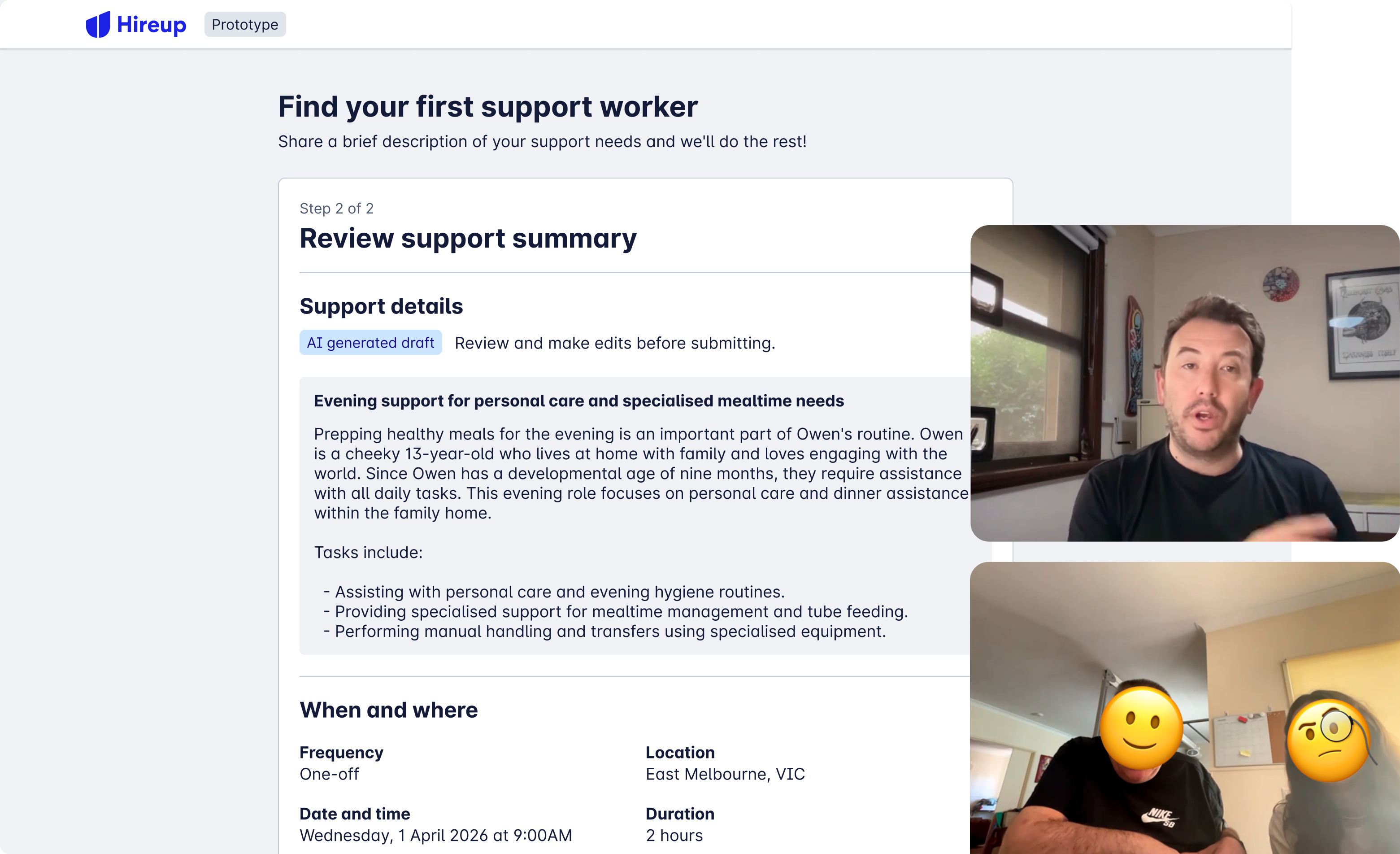
Prepping healthy meals for the evening is an important part of Owen's routine. Owen is a cheeky 13-year-old who lives at home with family and loves engaging with the world. Since Owen has a developmental age of nine months, they require assistance with all daily tasks. This evening role focuses on personal care and dinner assistance within the family home.
Tasks include:
Assisting with personal care and evening hygiene routines.
Providing specialised support for mealtime management and tube feeding.
Performing manual handling and transfers using specialised equipment.
If you are a caring person who would like to help Owen reach their goals, we would love to hear from you. Please reach out to arrange a chat.
Observations
❌ Too much fluffy language
❌ The job is for someone with the developmental age of around 9 months, it should not be written in the first person.
❌ Em dashes make it obviously look like LLM output
❌ Too many tasks, some of which are hallucinated
Observations
✅ Length is good and content is succinct
✅ POV is accurate
❌ Words are being spelled with 'z', need to enforce Australian English
[todo - What did I learn in the prompt design process?]
How would it work?
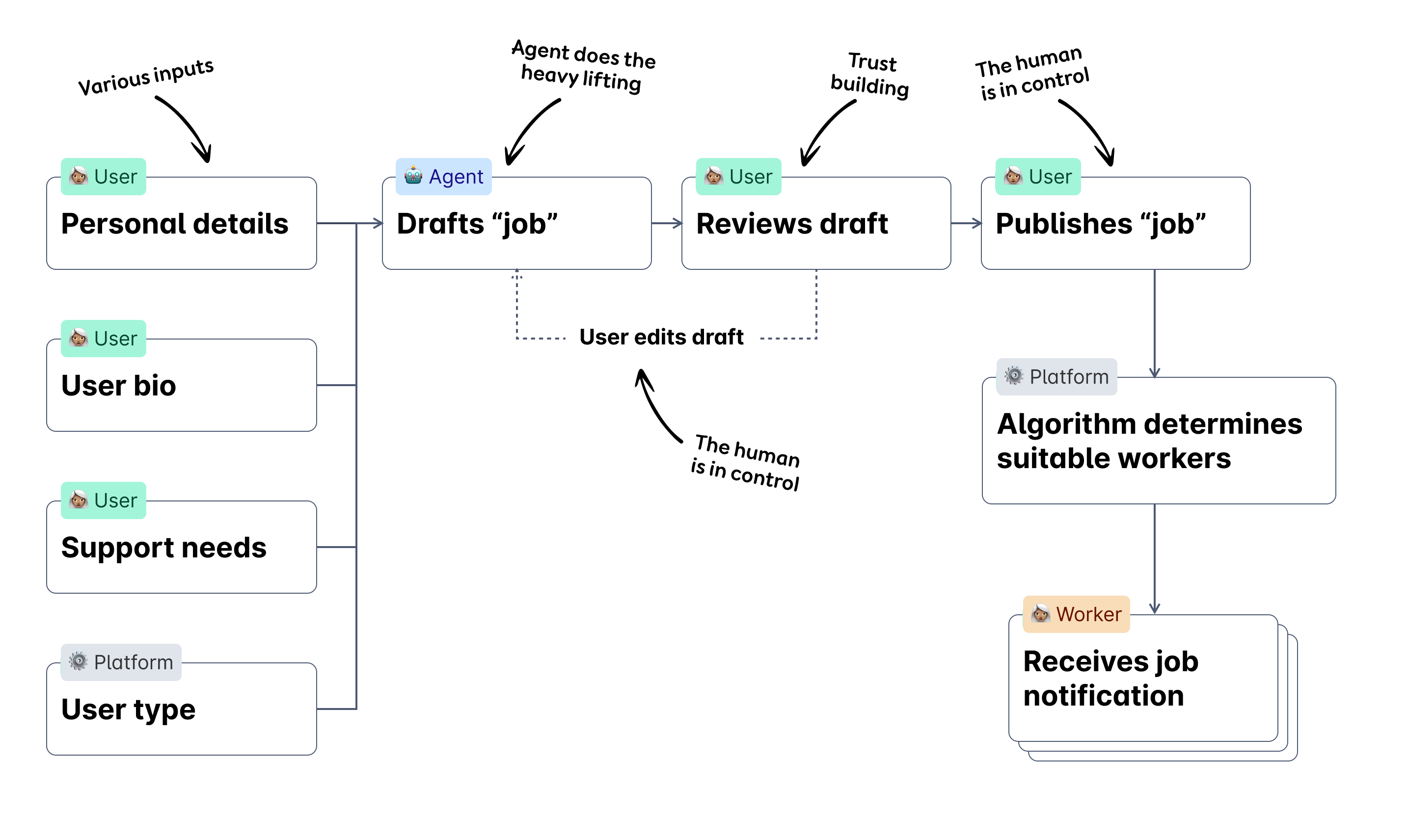
The agent consumes a mix of user and platform generated data, and drafts a job on behalf of the user. The user can then edit the job if they need to, ensuring humans are in control. Once published, the platform algorithmically decides which workers should receive the job.
The quality of the data we captured from users was integral to the agent's output being accurate and useful. Beyond that, this initiative opened up a conversation around the potential impacts of agentic data output to downstream consumers.
Ensuring our users are ‘in the loop’
I truly value time spent talking to our users, and as a practice put aside “getting close to the community time” each week. In the lead up to the launch of this feature, I met with a number of users to stress test the experience, and talk about topics of trust and privacy, their perceptions of AI and their familiarity and comfort levels with the technology.
Watching back my UR recordings is always a bit difficult because I'm always pulling silly faces. Here's me talking to a client and their support worker, as they test the prototype.
What we shipped
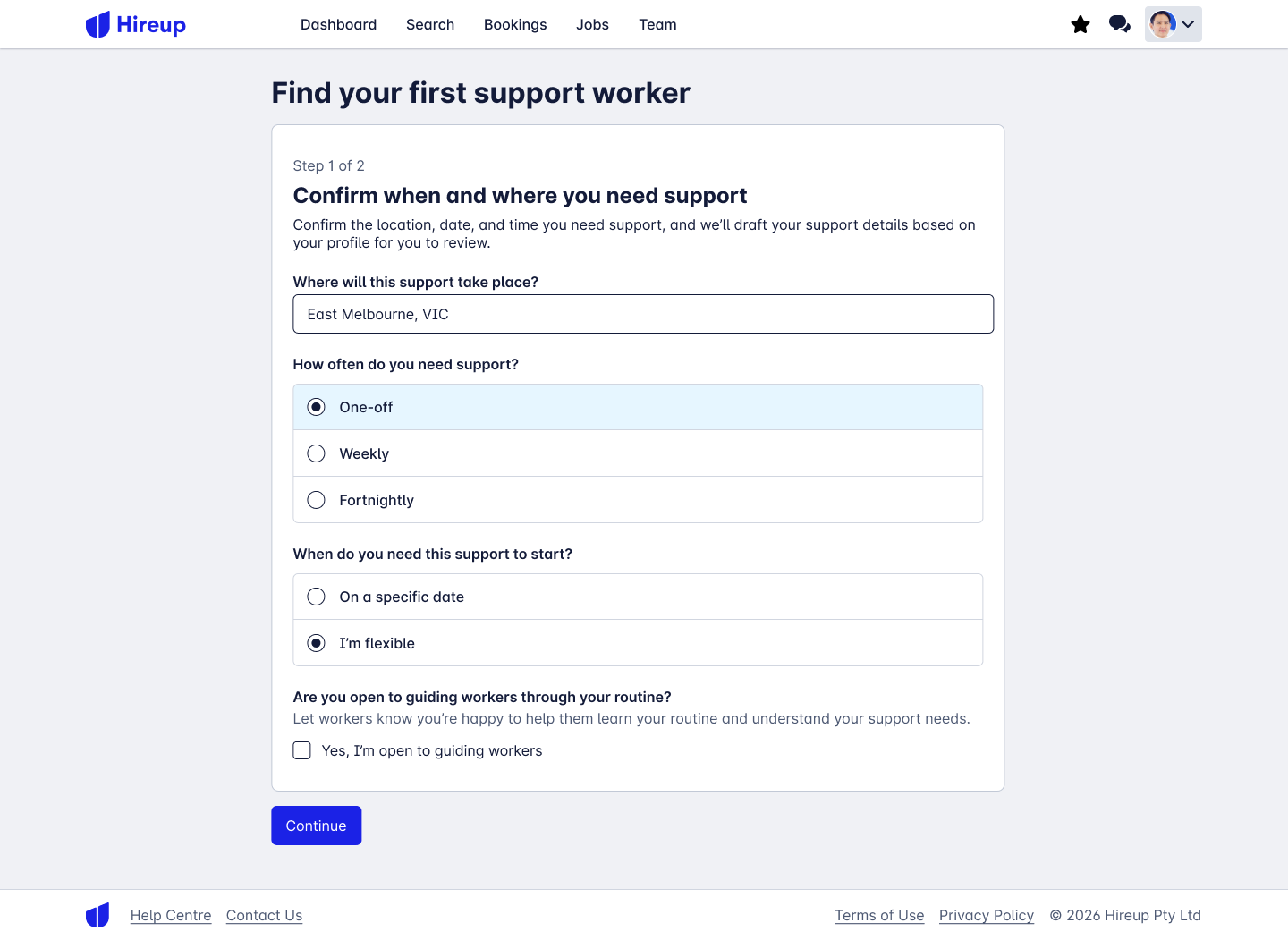
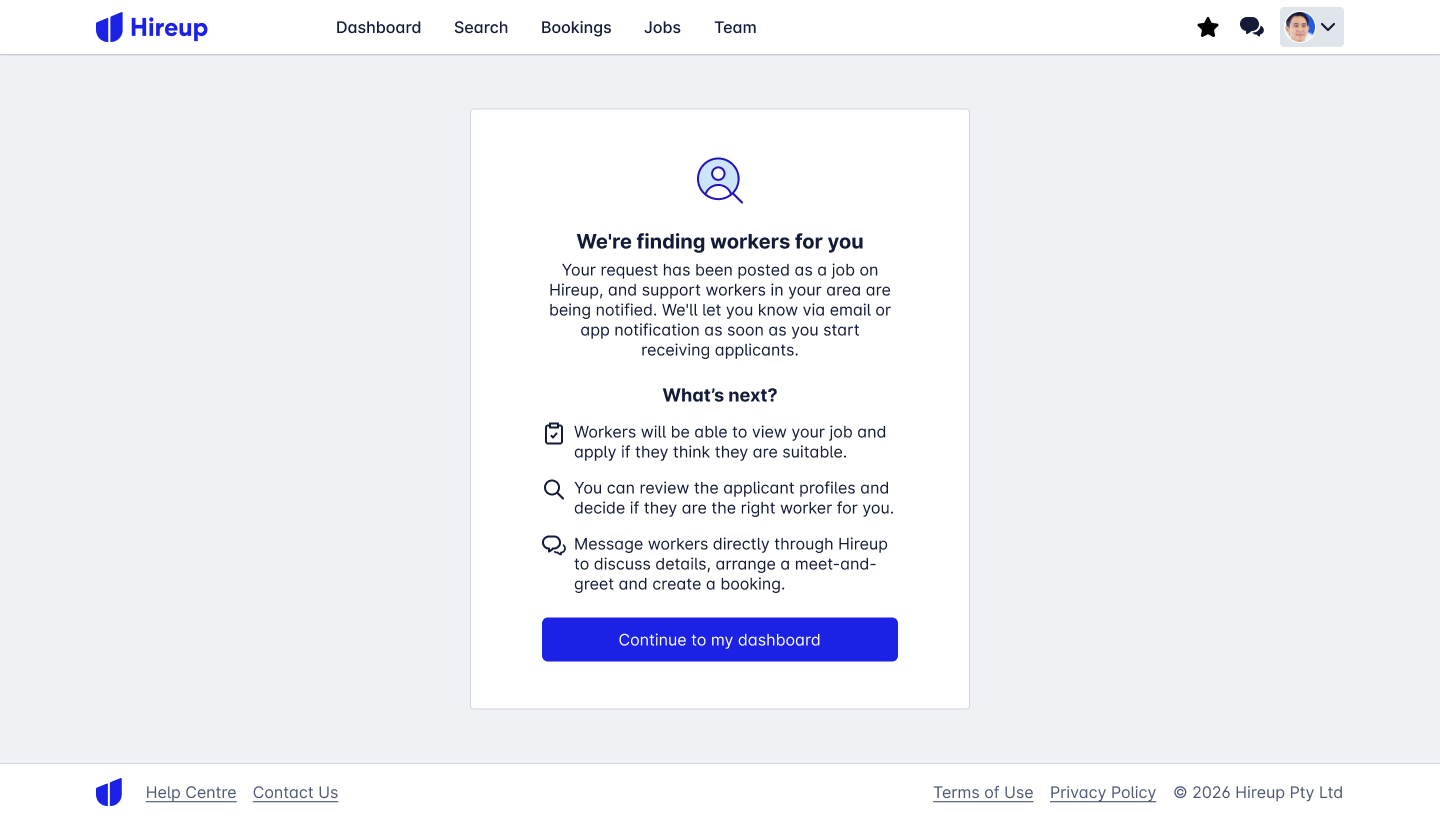
Instead of an elongated form that collected large amounts of data and introduced significant friction at the end of an already long unboarding process, we introduced a far smaller form, and an experience where the platform did the heavy lifting for the user.
Good forms only collect the data that we don't already know about a user.
Instead of providing large amounts of data themselves, we drafted it based on our existing knowledge of the individual.
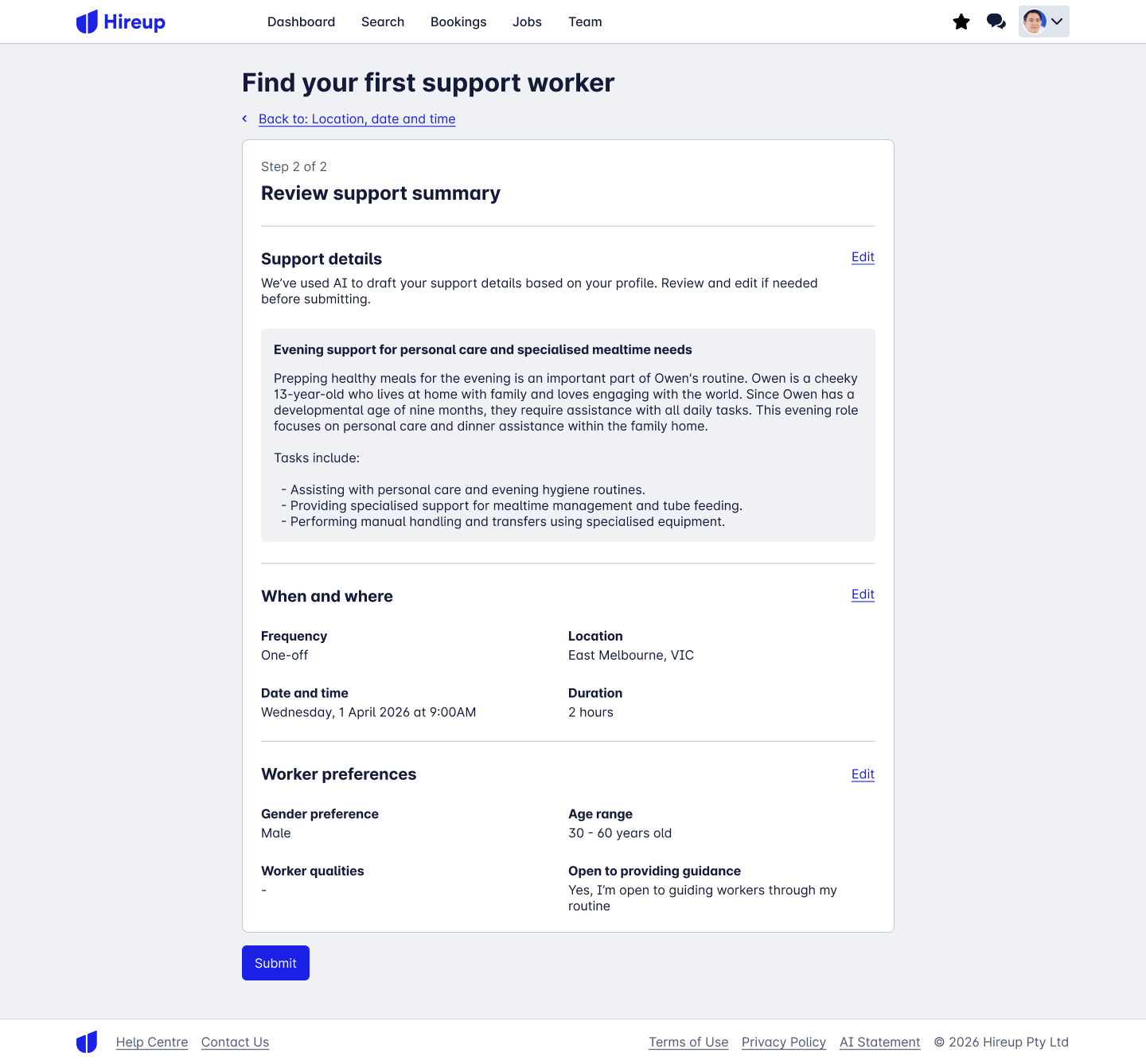
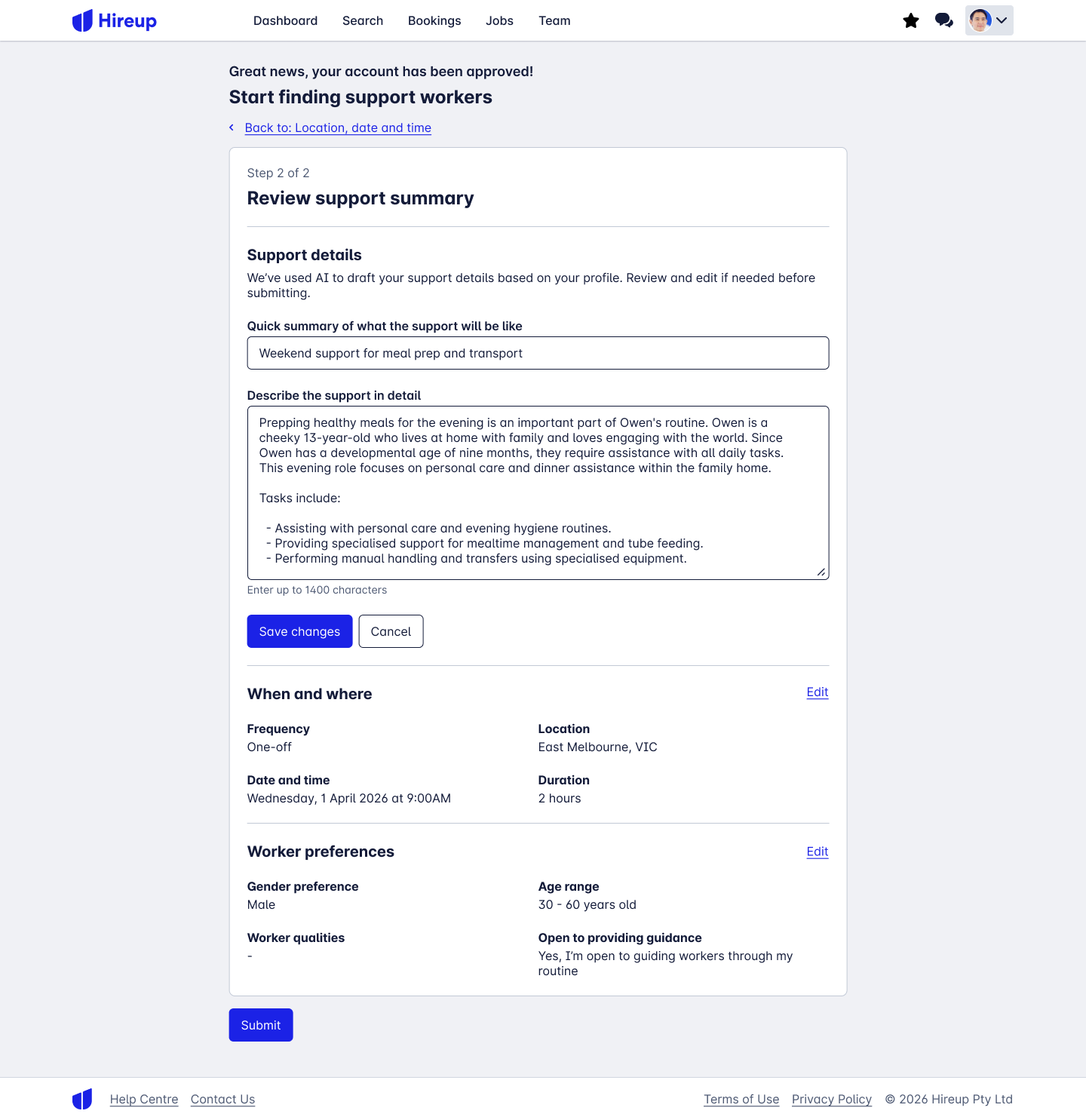
The edit pattern in the Review Support Summary step is heavily influenced by the Check Your Answers pattern in the GOV.UK design system, an interaction pattern validated through the use of millions of UK residents.
We kept a very close eye on edit rates. Low edit rates meant the experience was working well. What's a 'low' edit rate? We defined that as we went!
Contextual guidance about how processes work and what happens next contribute to good user experiences.
Monitoring progress of the experiment
The AI experience was A/B tested against a control group, with 50% of traffic being served to each flow.
The team also monitored the AI generated jobs in small batches throughout each of the early days after launch, watching for issues in the output.
We use Mixpanel to track qualitative data, including metrics such as edit, bounce, and completion rates, and once a job has been posted, worker application rates and job success.
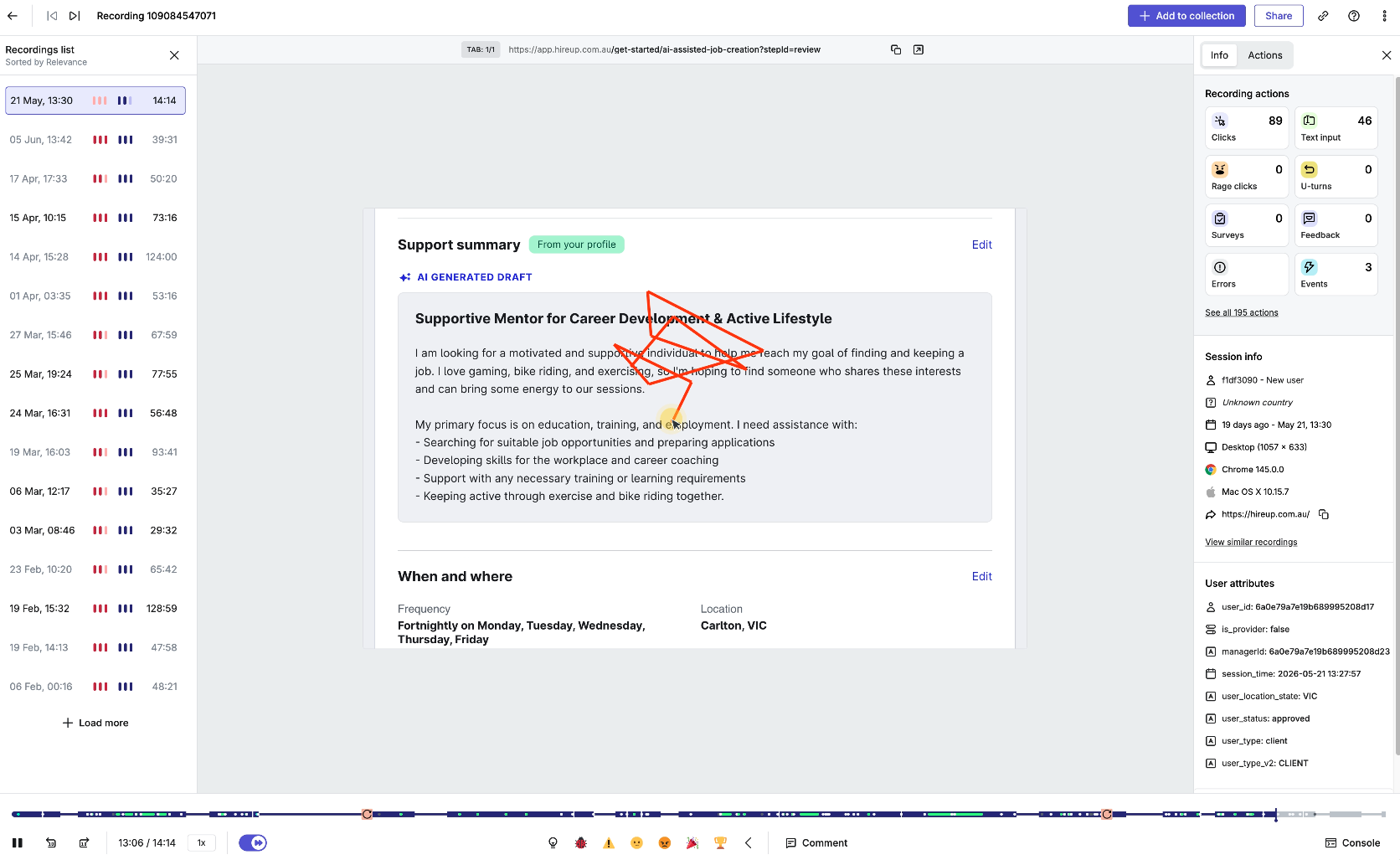
As a standard practice for new feature launches, we create a Slack channel which Hotjar pipes session recordings and survey feedback into. This lowers the barrier for the wider team and stakeholders, allowing them to stay close to our users engaging with the feature.
Session replays allowed us to closely monitor behavior of the users in the treatment group. We watched for patterns in user interaction, moments of hesitation, rage clicks and evidence that the users might be confused.
What did we learn?
The building got faster, but the thinking didn’t. Identifying where emerging AI tooling could provide benefit and where it didn’t was part of the fun and a significant learning opportunity in this project!
In hindsight, we spent way too much time designing in the prototyping tool, and should have jumped into production code far sooner for the finesse of the experience.
Even though users said they weren’t overly keen on AI assisted experiences, their behavior suggested otherwise.
Interface language matters. We debated whether or not we should be calling out AI as a selling point of the feature. Through testing we observed that when we specifically highlighted that AI was being used, it caused hesitation and doubt.
Regardless of the survey findings, new customers to Hireup were happy interacting with an AI experience to draft their first job. Conversion rates exceeded our expectations.
Outcomes
📈 We lifted first job creation rates in the treatment group to 85%, compared to 50% in the control group.
📈 Jobs in the treatment group attracted more applications within 24 hours, suggesting the quality of the job had improved.